Sunday, November 1, 2015

Boom 2 is a system-wide volume booster and equalizer Mac Osx


Boom 2 is a system-wide volume booster and equalizer app that is designed especially for OS X 10.10 Yosemite.
It comes with a smart interface, self-calibrates itself according to your Mac, offers hands-on advanced equalizer controls for finer audio control and amazing audio effects for enhanced audio output. You get a personalized acoustic experience on your Mac so that your Boom 2 sounds like you. Unique.
Boom 2 is a pro audio app that:
  • Auto-Calibrates itself according to the type of Mac
  • Runs exclusively on Yosemite along with 64-bit compatibility
  • Powerfully boosts volume more...

What's New

Version 1.3:
  • UI/UX updates.
  • Added new optional audio effects - Night Mode (DRC), Spacial, and Pitch.
  • Added VoiceOver support so that the visually impaired can also use/enjoy Boom 2
  • Added localization for Traditional Chinese

Requirements


Hackstore,Appstore Alternative to get paid apps FREE!! Mac

                      What would we all do without the Mac App store? Where would we get our apps from? did we have any apps before the Mac app store? Well, as vast as the App Store has become in such a short amount of time.  There actually were apps before Apple put together the massive collection of sanctioned software for everyone to drool and throw their money at. You just had to download them directly from the developers site. There were some that were paid and there many that were free. Apple capitalized on the apps that were out there by making an iTunes-like place for software that they could put their stamp of approval on for you to download. So in comes theHackstore, a place of non-Apple sanctioned apps, or non Apple approved apps that you can download for your Mac opposed to sourcing out and finding these apps at the dev’s site you can now get them on the Hackstore. This new place is still growing and while it can’t be compared to the Mac apps stores massive selection it still has many gems that can be very useful. From apps like Gimp, the next best thing to Photoshop, Lion Designer, Audacity, Opera browser and XBMC are all here at the Hackstore.
Even though it’s called the Hackstore the app claims to not support piracy, Ever. So what you’ll really find is a collection of awesome apps that Apple was too strict to allow on their App Store. This is a great place to find apps that let you do more than most apps from the Official App Store. Go check it out. Just download the DMG file, install and drag it to your dock, I placed mine right next to my App store icon for good measure. Enjoy!

Best Alternative for IDM (Internet Download Manager)

EagleGet
EagleGet is a universal download accelerator that supports HTTP, HTTPS, FTP, MMS and RTSP protocols. The application can also download video files from most popular online video websites. Helpfully, the developers have also created an extension for Google Chrome!
Features
  • Accelerate downloads by using multi-threaded technology.
  • Download files in Chrome, IE, Firefox and Opera with one click.
  • Support MMS, HTTP, HTTPS, FTP and RTSP protocols.
  • Download online videos from popular sites.
  • Built-in Media Grabber & Video Sniffer.
  • Built-in download scheduler for multiple queues.
  • Download different file types to separate folders.
  • Batch downloads function with clipboard capture.
  • Automatic refresh expired download address.
  • Support HTTP and SOCKET proxy.
  • Support fully customized User-Agent.
  • Monitor running and completed tasks with TaskMonitor.
  • Supports drag-and-drop to rearrange the priority of downloads.
  • Automatic run virus scan after download.
  • Automatic convert media format after download.
  • Convenient task properties panel.
  • Detailed connection log for each task.
  • Verify integrity of downloaded files.
  • Shutdown, hibernate or sleep computer after completing all transfers.
  • Built-in speed limiter.
  • Flexible notification configurations and Silent Mode (Game Mode) function.
  • Import download lists from other download managers.
  • Customizable user interface.
  • Supports multi-language interface (more than 30 languages).

How to Install?
  1.  Download the latest free setup of product
  2. Exit your browser
  3. Install setup file until finish
  4. Done and Enjoy! ðŸ˜€
Screenshots
Direct Download Link
Download Links


VOX music player For Mac OsX

VOX is a beautiful music player that supports many filetypes. The beauty is in its simplicity, yet behind the minimal exterior lies a powerful music player with a ton of features and support for all audio formats you should ever need. VOX was originally developed following the principles of clarity, simplicity and versatility. Thus, the minimalistic interface incorporates both essential and unique features, which let you:
  • Listen to your music regardless of the format
  • Play numerous lossy and lossless audio formats
  • Export playlists in various formats (PLS, M3U, XSPF)
  • Open different more...

What's New

Version 2.6.2:Note: Now requires OS X 10.9 or later.
  • Fixed bug with YouTube streams
  • Fixed some crashes related to artwork loading

Requirements


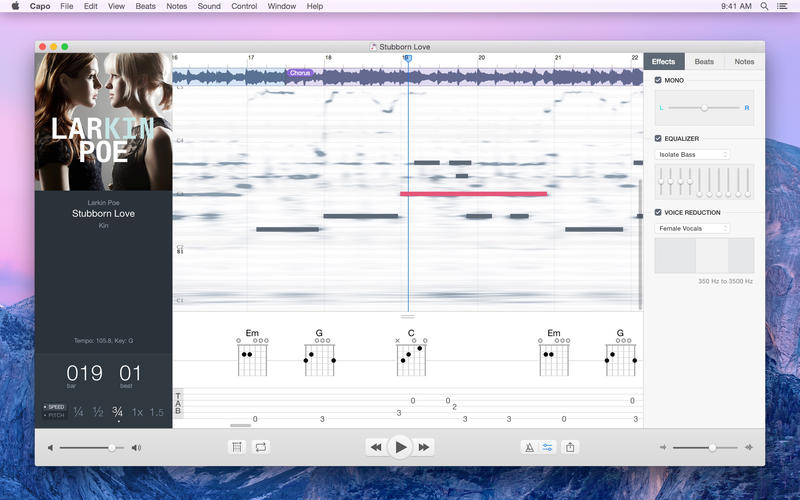
Capo lets you slow down your favorite songs so you can hear the notes and learn how they are played Mac Osx


Capo lets you slow down your favorite songs so you can hear the notes and learn how they are played. With Capo, you can quickly tab out your songs atop a highly-detailed OpenCL-powered spectrogram display.
Features
  • Detect, and enter chords
  • Pitch adjustment
  • Mark song sections
  • Loop at slower speeds
  • Export Capo-adjusted music
  • Basic effects available

What's New

Version 3.3.1 (3.3.2):Note: The version available for download is 3.3.2. The version available in the Mac App Store is 3.3.1.
  • Corrected some issues with drag & drop from iTunes.
  • Resolved an issue that led to excessive memory use
  • Fixes the most frequent crashes.

Requirements


Folx GO Mac OSX

Folx GO Pre-Cracked For Mac is Here! [Latest] 

29767
Folx GO
Folx combines two functionalities, download manager and torrent client. Folx makes downloading extremely easy, just open the page with the file to be downloaded, click the link in your browser and Folx will start the download for you. The application splits the file being downloaded in up to ten threads, thus significantly increasing the download speed. Its auto resume option comes handy when the downloading gets interrupted. You can also assign a tag or a few to the downloaded content for accurate and easy search through the downloaded files. You can optimize traffic allocation between different applications by regulating manually the download and upload speed. Folx is also available as PRO version. It brings such handy features as splitting the downloads in up to 10 threads which speeds up the download process; scheduling the download tasks according to your convenience; smart speed adjustment option (download speed will be adjusted automatically whenever you need to use Internet traffic to run other applications), iTunes integration and searching the web for torrents directly from Folx.
How to crack?
  1. There is no need, it’s already cracked for you. Just download the zip file from the link below and unzip it.
  2. Drag and drop the app into Applications folder.
  3. You’re done! Enjoy!! :)
Screenshots
screen800x500screen800x500 (1)screen800x500 (3)screen800x500 (2)screen800x500 (4)
Download Links

Vipre Internet Security 2016 Lifetime Activator is Here!

Vipre Internet Security 2016 Lifetime Activator is Here! 

VIPRE Internet Security 2016
VIPRE Internet Security 2016 is packed with sophisticated computer internet security features that protect against viruses and other malware threats without slowing down your PC. You won’t notice it’s running (even during scans and updates)
Features
  • Edge Protection
  • Easy-to-Use Interface
  • Social Watch ™
  • Search Guard ™
  • Auto Patch ™
  • Easy Install ™
  • Two-way firewall
  • Spam filter
  • Bad website blocker
  • High-performance anti-malware engine
  • All-in-one PC security
  • Real-time monitoring and protection
  • Removable device scanning
  • More………
How To Activate
  1. Install VIPRE Internet Security 2016
  2. Shutdown VIPRE from tray icon near clock..
  3. Run & Apply patch.
  4. Update VIPRE
Screenshots
VIPRE-Internet-Security-2016

Download Link